Colorful Sticky Notes + Widget1.5.4
Publisher Description

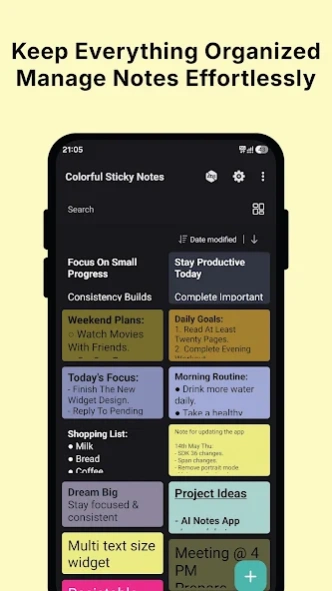
Colorful sticky notes with transparent widgets, rich text & customization
Capture Ideas Quickly with Beautiful Sticky Notes & Widgets
Create colorful sticky notes, customize home screen widgets, organize tasks, and capture ideas effortlessly. Use rich text formatting, transparent backgrounds, custom colors, and resizable widgets to design notes exactly the way you want.
Whether you're creating quick reminders, to-do lists, daily goals, sticky note widgets, shopping lists, or personalized home screen notes, Colorful Sticky Notes makes note-taking simple, flexible, and visually beautiful.
✨ Main Features
✓ Beautiful Home Screen Widgets
Add stylish sticky note widgets directly to your home screen and access your notes instantly.
✓ Resizable Widgets
Resize widgets freely to perfectly fit your home screen layout.
✓ Transparent & Custom Backgrounds
Choose from multiple predefined colors or create your own custom colors. Adjust transparency from 0% to 100% for elegant glass-style widgets.
✓ Rich Text Formatting
Customize any part of your note with:
• Bold
• Italic
• Underline
• Strikethrough
• Multiple text colors
• Different text sizes
✓ Multiple Notes in One Widget
Display multiple notes inside a single widget for better organization and quick access.
✓ Text Alignment & Rotation
Adjust text alignment and rotate notes to create unique widget styles.
✓ Quick Notes
Create and save notes instantly with a single tap - no widget required.
✓ Backup & Restore with Google Drive
Securely back up your notes to Google Drive and restore them anytime when switching devices or reinstalling the app.
✓ Organize Notes Easily
Search, sort, edit, and manage all your sticky notes in one place.
✓ Multiple Sorting Options
Sort notes by:
• Note text
• Date created
• Last modified date
✨ Perfect For
• Daily reminders
• To-do lists
• Study notes
• Shopping lists
• Grocery lists
• Work notes
• Meeting notes
• Motivational quotes
• Home screen customization
• Productivity workflows
How to Add a Widget
Long press your home screen → Widgets → Colorful Sticky Notes
Permissions
Internet permission is required only to display ads.
Pro Version
Upgrade to the Pro version to remove ads and enjoy an uninterrupted experience.
Create beautiful sticky notes, stay organized, and personalize your home screen with colorful note widgets. Download Colorful Sticky Notes today and keep your important notes always within reach.
About Colorful Sticky Notes + Widget
The company that develops Colorful Sticky Notes + Widget is Divyesh Devlani. The latest version released by its developer is 1.5.4.
To install Colorful Sticky Notes + Widget on your Android device, just click the green Continue To App button above to start the installation process. The app is listed on our website since 2026-08-16 and was downloaded 7 times. We have already checked if the download link is safe, however for your own protection we recommend that you scan the downloaded app with your antivirus. Your antivirus may detect the Colorful Sticky Notes + Widget as malware as malware if the download link to com.dev.stickynoteswidget is broken.
How to install Colorful Sticky Notes + Widget on your Android device:
- Click on the Continue To App button on our website. This will redirect you to Google Play.
- Once the Colorful Sticky Notes + Widget is shown in the Google Play listing of your Android device, you can start its download and installation. Tap on the Install button located below the search bar and to the right of the app icon.
- A pop-up window with the permissions required by Colorful Sticky Notes + Widget will be shown. Click on Accept to continue the process.
- Colorful Sticky Notes + Widget will be downloaded onto your device, displaying a progress. Once the download completes, the installation will start and you'll get a notification after the installation is finished.
Program Details
System requirements
Download information
Pricing
Version History
version 1.5.4
posted on 2026-08-16
• Direct Notes: Add notes in the app - no widget required.
• Cloud Backup: Secure backup & restore using Google Drive.
• Quick Search: Instantly find your notes.
• Sorting: Better options to organize notes.
• Formatting: Added strikethrough text style.
• Custom Defaults: Set default text size, color, and background.
• UI Refresh: Cleaner, smoother, and more responsive interface.
• Performance: Bug fixes and stability improvements.
version 1.5.0
posted on 2026-06-12
• Now you can add notes directly - no widget required!
• Added search option to quickly find your notes.
• Sorting options are now available for better organization.
• New strikethrough formatting added for your notes.
• Added default note settings for text color, background color, and text size.
• Refreshed UI for a smoother, cleaner experience.
• General bug fixes and performance improvements.
version 1.4.6
posted on 2026-05-21
• Now you can add notes directly - no widget required!
• Added search option to quickly find your notes.
• Sorting options are now available for better organization.
• New strikethrough formatting added for your notes.
• General bug fixes and performance improvements.
• Refreshed UI for a smoother, cleaner experience.
version 1.3.1
posted on 2025-08-02
- Added Strikethrough option.
- Bug fixes and performance improvements.
- UI improvements.
version 1.2.6
posted on 2023-08-28
- Bug fixes and performance improvements!
- UI improvements!
version 1.2.1
posted on 2022-01-02
Bug fixes and performance improvements!
